
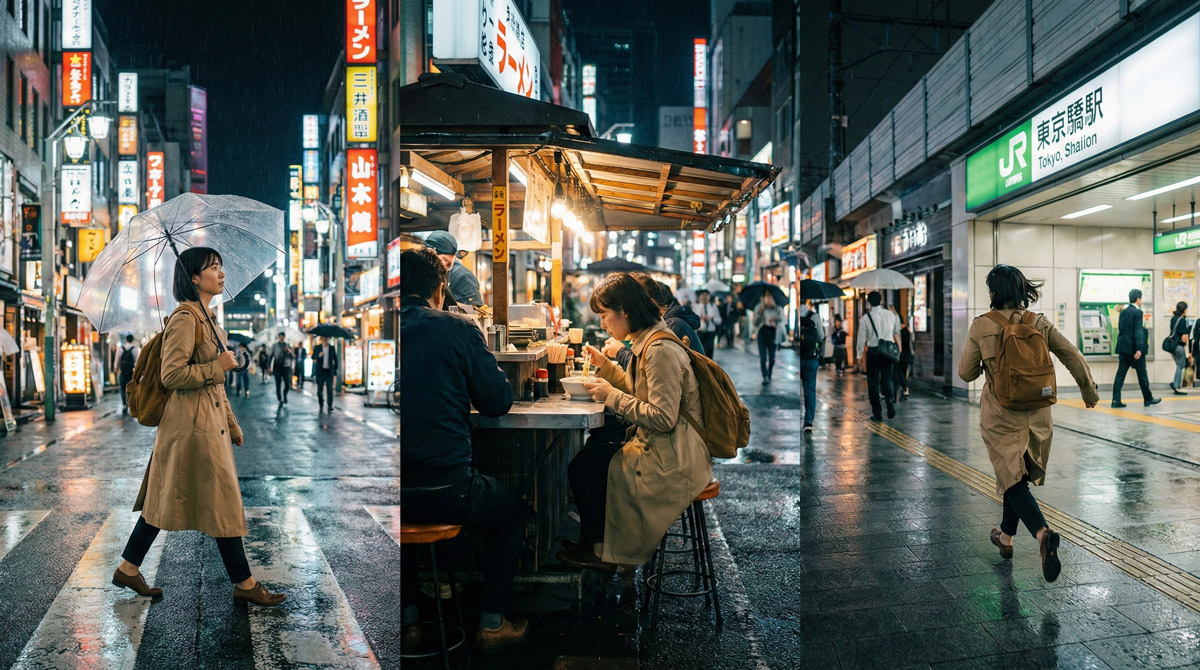
Keep Characters Consistent Across Shots and Episodes
Last updated: 13 March 2026
Keeping a character looking and feeling the same across multiple AI-generated shots is harder than it sounds. Models love to drift: faces morph, outfits change, styles wobble. This guide shows you how to keep characters consistent in AI video, with practical, repeatable ways to keep your characters visually and tonally locked in across shots — and even across whole series.
Whether you are making short skits, a recurring “host” format, or an ongoing narrative, the goal is the same: your audience should immediately recognise the character, even as scenes and settings change.
1. What “Character Consistency” Actually Means
Consistency is more than just using the same name in your prompts. For AI video in 2026, it usually breaks down into four pillars:
- Visual identity – face shape, hair, age, body type, clothing, props.
- Style – realism vs anime, colour palette, level of detail, lighting and camera behaviour.
- Motion and behaviour – how the character moves, gestures, and reacts.
- Voice and personality (if you add audio) – tone, pacing, emotional range.
Most modern tools now offer some mix of reference images, seed locking, or identity-preservation features — but none are perfect. The trick is to design a workflow that gently pushes the model back towards your “true” character every time it tries to wander.
2. Lock the Character Before You Animate Anything
The more you decide up front, the less the model has to invent on your behalf.
2.1 Create a simple “character bible”
One page is enough:
- Name and a one-line description (e.g. “Mira, a late-20s VFX artist who hosts an AI video channel”).
- Core visual traits – hair style/colour, typical outfit, accessories, body type, age range.
- Style notes – “semi-realistic, soft lighting, shallow depth of field, 24fps film look”.
- Personality keywords – calm / fast-talking / dry humour / earnest / chaotic etc.
You will reuse this wording across prompts, storyboards and voice direction.
2.2 Generate a “hero stills” pack
Even if you mainly work in text-to-video, spend time creating 4–8 strong still images of the character:
- Front, three-quarter and side angles.
- A few key outfits you plan to reuse.
- Neutral expression plus 1–2 on-brand emotions (e.g. “curious”, “deadpan amused”).
Export these at a high resolution and keep them in a clearly labelled folder. These become your reference images for image-to-video tools and for “image reference” slots in text-to-video models.
Tip: If your model supports seed values, save the seed for your best hero still. Reusing the same seed with small prompt changes can help keep facial structure stable across related shots.
2.3 Set a style and camera baseline
Across episodes, you want shots to feel like they belong in the same show. Decide on:
- Typical aspect ratio (e.g. 16:9 for YouTube, 9:16 for Shorts).
- Preferred camera language – close-ups vs mid-shots, handheld vs tripod, slow vs snappy moves.
- A simple style sentence you can reuse in every prompt (e.g. “cinematic, soft key light, shallow DOF, 35mm lens, natural colour grade”).
Keeping this baseline stable is one of the easiest ways to maintain a coherent visual identity across episodes.
3. Build a Reusable Character Prompt Template
Instead of re-inventing the prompt every time, create a template you copy and lightly adapt.
3.1 Master prompt structure
A practical layout:
[Shot role]: [what is happening in this specific shot]
[Character block]: [fixed description of appearance + outfit]
[Style block]: [fixed style/camera sentence]
[Environment]: [location + mood for this shot]
For example:
Shot role: host explains why today’s AI video model handles motion better.
Character block: Mira, late-20s woman, wavy dark hair in a loose bun, round glasses, navy hoodie with small logo, black jeans, slim build.
Style block: cinematic, soft key light, shallow depth of field, 35mm lens, natural colours, subtle noise, 24fps filmic motion.
Environment: in a cosy studio with a computer desk, monitors showing abstract UI, blurred shelves with plants in the background.
You might tweak the “Shot role” and “Environment” per shot, but the “Character block” and “Style block” should stay as stable as possible.
3.2 Add an “identity lock” layer
Many current AI video tools now include some form of:
- Reference image strength sliders.
- Face or identity preservation toggles.
- Seed locking or variation controls.
- Character reference inputs.
When consistency matters more than novelty:
- Increase reference strength slightly.
- Reduce variation or randomness.
- Keep seed values fixed across related shots.
Then only change pose, camera distance and environment.
3.3 Negative prompt / “do not change” list
Even if your tool doesn’t expose an explicit negative prompt field, you can still reinforce boundaries in your wording:
- “Same face and outfit as previous shots.”
- “Do not change hair colour or hairstyle.”
- “Do not add hats, helmets or glasses if they were not present.”
If your model supports negative prompts directly, keep a short reusable list there (e.g. “no extra limbs, no distorted faces, no outfit changes between frames”).
4. Keeping Characters Consistent Inside a Single Shot
Once you’re happy with the character design, the next challenge is preventing drift within a single clip.
4.1 Prefer image-to-video when possible
A common stable workflow is:
- Generate the best hero still of the shot using your character prompt.
- Feed that image into your video model in image-to-video or image-guided mode.
- Keep the character and style wording almost identical between the still and video prompts.
This gives the model a clear target to track during motion.
4.2 Be conservative with motion and creativity
Most text-to-video tools include controls such as:
- Motion strength or camera motion.
- Prompt strength vs reference strength.
- Creativity, variation or stylisation sliders.
If you push these too far, the model may change the character to satisfy “interesting motion”.
For dialogue shots and character-focused scenes:
- Use moderate motion settings.
- Prioritise facial stability over dramatic camera movement.
Save extreme camera moves and chaotic action for B-roll or cutaways where small drift is less noticeable.
4.3 Keep time spans short
Long clips give the model more chances to wander.
It is often better to generate:
- Multiple shorter shots (3–6 seconds each), then edit them together.
- Several variants of the same short clip and choose the most stable one.
Short, controlled shots are far easier to keep “on model” than a single long take.
5. Keeping Characters Consistent Across Multiple Shots
This is where series and recurring formats either feel cohesive or start to drift.
5.1 Reuse the same backbone: model, version and settings
For a given series or season, try to keep the following stable:
- The same base model and version.
- The same frame rate, resolution and aspect ratio.
- Similar motion and guidance settings for similar shot types.
Switching models mid-project often causes more visual drift than any prompt wording.
5.2 Use reference frames between episodes
When starting a new episode:
- Include one of your strongest hero frames from a previous episode as an image reference.
- Remind the model in the prompt: “same character and outfit as the reference frame”.
- If available, enable identity-preservation features.
Even without formal character locking, reference images strongly bias the model toward the original design.
5.3 Build a character preset per tool
Many platforms now allow you to save:
- Prompt templates or styles.
- Reference image sets.
- Default aspect ratio and quality settings.
Create a named preset per character and always start from that rather than a blank prompt.
It prevents small wording changes from gradually introducing drift.
6. Managing Multiple Characters and Casts
Once you have more than one recurring character, organisation becomes important.
6.1 Give each character their own sheet
For each recurring character, keep a simple “character sheet” with:
- Canonical prompt block (appearance + style).
- Reference image filenames or links.
- Notes on poses, expressions and recurring props.
- Which tools and presets they use.
This becomes your internal source of truth.
6.2 Be explicit when multiple characters appear together
When a shot includes two or more recurring characters:
- Describe them separately: “Character A: … Character B: …”.
- Anchor their positions (“A on the left, B on the right”).
- Maintain the same order in your prompts to avoid identity swaps.
Ambiguity is one of the biggest causes of character confusion in AI video.
7. Troubleshooting Character Drift
Even with good workflows, models will still drift sometimes.
7.1 Face or body changes mid-shot
Symptoms: facial structure shifts or body proportions wobble.
Try:
- Switching to an image-to-video workflow anchored to a strong hero still.
- Reducing motion strength or randomness.
- Shortening clip length and trimming the most stable section.
- Reusing the exact seed from a stable generation.
7.2 Outfit or accessory drift
Symptoms: hats appear unexpectedly, logos disappear, or clothing changes colour.
Try:
- Reinforcing outfit descriptions in the character block.
- Adding explicit restrictions (“same navy hoodie, no hats, no headphones”).
- Regenerating only the problematic shots and replacing them in the edit.
7.3 Style inconsistency across episodes
Symptoms: some episodes look cinematic while others appear flat or cartoony.
Try:
- Locking a single base model/version for the entire season.
- Saving a reusable style preset.
- Maintaining a small “style board” of reference frames that define the show’s look.
8. Example Workflows
Sometimes it helps to see how everything fits together.
8.1 Recurring host for a weekly AI news show
- Design one host character and lock their outfit and style for the season.
- Create 6–8 hero stills in different poses at the same desk or studio.
- For each episode:
- Draft a script and identify talking-head shots vs B-roll.
- Generate short host clips (3–6 seconds) using image-to-video from hero stills.
- Generate B-roll with looser prompts where drift is less noticeable.
- Reuse the same style sentence and camera language every time.
8.2 Narrative series with multiple recurring characters
- Create a one-page character sheet for each main character.
- Define a shared visual style for the entire series.
- Storyboard scenes using simple beats: who is present, what happens, and the mood.
- Generate key stills first, then animate them into shots.
- Maintain a gallery of “canonical” frames per character and reuse them when drift appears.
9. Quick Checklist for Consistent Characters
Before committing to a long project, run through this checklist:
- ✅ I have a short written character bible for each recurring character.
- ✅ I’ve generated and saved 4–8 hero stills per character.
- ✅ I’m using a repeatable prompt template with stable character and style blocks.
- ✅ Important shots are anchored with reference images or image-to-video.
- ✅ Motion and creativity settings are moderate for dialogue scenes.
- ✅ I use the same model version, aspect ratio and visual style across episodes.
- ✅ I maintain reference frames and notes so I can recover quickly if drift appears.
With a small amount of upfront structure, you can get the creative flexibility of AI video while keeping characters recognisable across shots, episodes and entire series.